# \[OUTDATED] Staking Ethereum

## Overview

* In three simple steps you can stake any amount of ETH, mint osETH as a liquid staking token and deposit your osETH into Eigenlayer or Symbiotic. &#x20;
* Our Stakewise vault allows you to mint osETH, which is a liquid staking token (LST). The issued liquid staking token is overcollateralized, meaning the underlying assets in the vault are worth more than the osETH issued.&#x20;
* You will be able to deposit your Liquid Staking Tokens (LSTs) via [OPUS Pool](https://opus.chorus.one/pool/stake/) and participate in the restaking ecosystem. As more EigenLayer AVSs go live, you will be able to delegate LSTs to Chorus One and receive rewards from your restaked tokens.
* For an introduction to OPUS Pool, its benefits for institutions, investors, and use cases, please visit our overview page: [OPUS Pool](https://kb.chorus.one/our-products/chorus-one-ethereum-staking)

***

## **How to stake with OPUS Pool**

First, access OPUS Pool at: [https://opus.chorus.one/pool/stake/  ](https://opus.chorus.one/pool/stake/)

{% hint style="info" %}
If you are using Fireblocks, please see:

* [Using Fireblocks with OPUS Pool](https://kb.chorus.one/our-products/chorus-one-ethereum-staking/using-fireblocks-with-chorus-one-staking)
  {% endhint %}

#### Currently, there are three ways in which you can use OPUS Pool.&#x20;

1. Stake any amount of ETH via OPUS Pool
2. Mint osETH from your staked ETH to be used in other DeFi protocols or for restaking
3. Restake your osETH or [other supported LSTs](https://kb.chorus.one/our-products/chorus-one-ethereum-staking/..#supported-liquid-staking-tokens-lsts-can-be-seen-below) to EigenLayer or Symbiotic

The first methods involves staking and optionally minting your osETH through OPUS Pool and depositing it directly into EigenLayer or Symbiotic, while the second method enables you to skip minting osETH and directly deposit any accept liquid staking tokens directly into supported restaking protocols on OPUS Pool.\
\
Both methods are made as simple as possible to enhance your staking experience, and can be completed in just three steps as described below.

***

### ‍**Stake ETH, Mint osETH, Deposit Supported LRTs, and Restake on OPUS Pool**

#### **Step 1:** Connect your wallet on the OPUS Pool page and choose a vault.

First you'll need to connect your wallet to OPUS Pool by clicking on the 'Connect Wallet' button in the upper right hand corner. There are a few options to choose from.

<figure><img src="https://161360822-files.gitbook.io/~/files/v0/b/gitbook-x-prod.appspot.com/o/spaces%2Fyuw4Rsarhx3nMuCdobop%2Fuploads%2Fzku5wvOGbnPxlprtuxNM%2FScreenshot%202025-02-19%20at%205.49.38%E2%80%AFPM.png?alt=media&#x26;token=3f3d9f27-5733-4638-a4bb-6c175ca60f8c" alt="" width="563"><figcaption><p>Options to connect to OPUS Pool</p></figcaption></figure>

You can connect directly with your Ledger with the Ethereum app open, use WalletConnect, or MetaMask as another way to seamlessly interface with the app using a Ledger device.&#x20;

For instructions on getting started with MetaMask, please see: [getting-started-metamask](https://kb.chorus.one/wallets/wallets/getting-started-metamask "mention")

Once you've connected your wallet you can choose the Chorus One MEV Max vault or the Chorus One Obol DV vault. (Screenshot example shown below).

{% hint style="info" %}
You can hover over the "i" symbol next to each to view the vaults on Stakewise V3 and you can learn about the differences between each vault by checking the table menus below.
{% endhint %}

<figure><img src="https://161360822-files.gitbook.io/~/files/v0/b/gitbook-x-prod.appspot.com/o/spaces%2Fyuw4Rsarhx3nMuCdobop%2Fuploads%2FY2fKYWrHpMG2S4JR5jOC%2FScreenshot%202024-07-23%20at%208.01.51%E2%80%AFAM.png?alt=media&#x26;token=a36b5526-8ea6-4a6a-b1f0-31fb8acee563" alt=""><figcaption><p>The MEV Max vault of the Obol DV vault</p></figcaption></figure>

{% tabs %}
{% tab title="MEV Max Vault" %}
Chorus One’s ground-breaking MEV research ensures the highest yields with top-tier security and enterprise-level infrastructure. We use our in house program, Adagio, to maximize MEV yields for our stakers. &#x20;

If you'd like to take a deep dive, Chorus One's pioneering MEV research led to the design of [**Adagio**](https://chorus.one/articles/timing-games-and-implications-on-mev-extraction) an in-house, optimized Ethereum MEV-boost client that increases our MEV rewards by optimizing the way we interact with the transaction supply chain.

* In a recent pilot with Adagio were able to generate 4.75% additional MEV rewards.
  {% endtab %}

{% tab title="Obol DV Vault" %}
This vault represents a distributed validator cluster , using Obol's DV technology to run the validators across multiple nodes. As a staker, you can expect higher uptime, decreased slashing risk, and a meaningful contribution to the decentralization of the Ethereum network.&#x20;

By staking with an Obol DV, you automatically participate in the Obol Contributions initiative, contributing 1% of staking rewards to the "1% for Decentralization" retroactive funding model. Your contributions will be tracked and recognized by Obol and can be viewed on our staking dApp, OPUS Pool.
{% endtab %}
{% endtabs %}

#### **Step 2:** Select how much ETH you wish to stake, enter the amount, and click '**Confirm and Stake**'

{% hint style="success" %}
At this point, you're now staking your ETH!&#x20;

However, if you want to restake your supported LSTs in EigenLayer or Symbiotic, read on!
{% endhint %}

<figure><img src="https://161360822-files.gitbook.io/~/files/v0/b/gitbook-x-prod.appspot.com/o/spaces%2Fyuw4Rsarhx3nMuCdobop%2Fuploads%2F6ftVUfSaFEEalergOKg5%2Fimage.png?alt=media&#x26;token=79a21906-1a2a-4002-8edd-de710c6e10bd" alt=""><figcaption><p>Your ETH is now staked! </p></figcaption></figure>

#### **Step 3 (Optional):** Mint osETH and deposit it or other LSTs into Restaking Protocols

{% hint style="warning" %}
**Note:** **Minting osETH is completely optional**

However, doing so allows you to have an overcollateralized representation of your staked ETH to participate in restaking protocols like EigenLayer, Symbiotic, or use it in other DeFi protocols such as [boosted-eth-staking](https://kb.chorus.one/our-products/chorus-one-ethereum-staking/boosted-eth-staking "mention").
{% endhint %}

Once deposited successfully, you can now mint your osETH in 1-click by clicking '**Mint osETH**' as shown in the screenshot above.&#x20;

<figure><img src="https://161360822-files.gitbook.io/~/files/v0/b/gitbook-x-prod.appspot.com/o/spaces%2Fyuw4Rsarhx3nMuCdobop%2Fuploads%2FU4CPvwTejjtSb0CNodYZ%2Fimage%20(1).png?alt=media&#x26;token=6cfba79b-c67e-4408-bae8-cf77707d62dc" alt=""><figcaption><p>You've successfully minted osETH!</p></figcaption></figure>

***

### **How to Restake your osETH or other supported Liquid Restaking Tokens (LRTs)**

You can bring your [supported liquid staking tokens](https://kb.chorus.one/our-products/chorus-one-ethereum-staking/..#supported-liquid-staking-tokens-lsts-can-be-seen-below) minted on any external platform and deposit them into EigenLayer through [OPUS Pool](https://opus.chorus.one/pool/stake/)

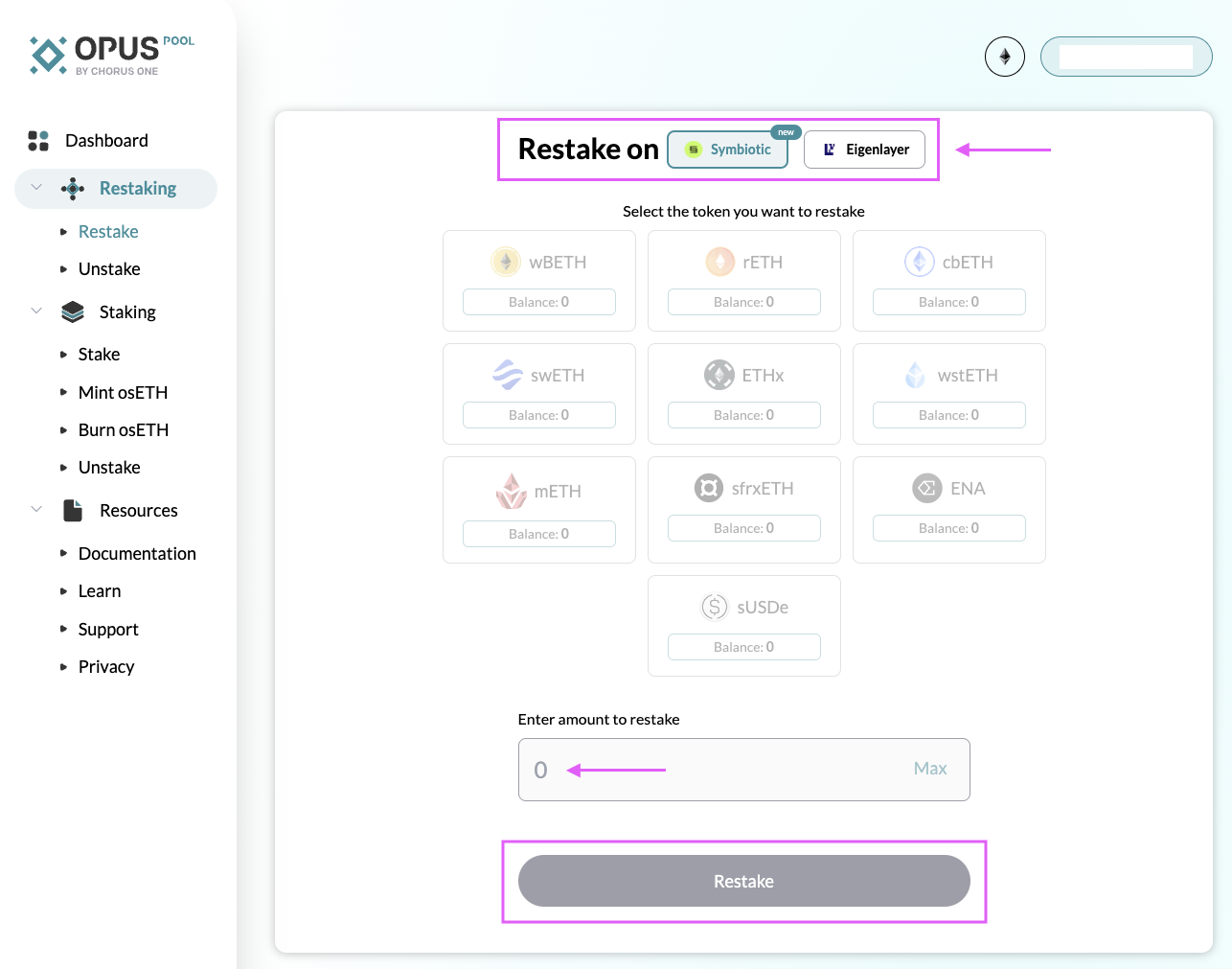
**Step 1:** Go to the OPUS Pool page, select Restake and connect your wallet

<figure><img src="https://161360822-files.gitbook.io/~/files/v0/b/gitbook-x-prod.appspot.com/o/spaces%2Fyuw4Rsarhx3nMuCdobop%2Fuploads%2Fs0L17x4C6DX9Krdbf67I%2FScreenshot%202024-07-23%20at%208.04.07%E2%80%AFAM.png?alt=media&#x26;token=2a083d09-39f3-4e2b-a521-d9294845b194" alt=""><figcaption></figcaption></figure>

**Step 2:** Select either EigenLayer or Symbiotic, (shown above) and then select your LRT (i.e. osETH) that you'd like to stake.&#x20;

* **Note:** At this time, only EigenLayer supports osETH restaking.&#x20;

<figure><img src="https://161360822-files.gitbook.io/~/files/v0/b/gitbook-x-prod.appspot.com/o/spaces%2Fyuw4Rsarhx3nMuCdobop%2Fuploads%2FclJAh0nak5ZZRyiXufYy%2Fimage%20(2).png?alt=media&#x26;token=9a75d42b-6feb-4c15-af6c-732431d6fba4" alt=""><figcaption><p>Example shown above restaking osETH to EigenLayer.</p></figcaption></figure>

**Step 3:** Deposit your LSTs into EigenLayer or Symbiotic.&#x20;

<figure><img src="https://161360822-files.gitbook.io/~/files/v0/b/gitbook-x-prod.appspot.com/o/spaces%2Fyuw4Rsarhx3nMuCdobop%2Fuploads%2Fj4byhfXhY3LBTSCVAPj5%2Fimage%20(3).png?alt=media&#x26;token=3f8392a8-c075-4b88-8ee3-60713df70371" alt=""><figcaption><p>Example of a successful restaking transaction. </p></figcaption></figure>

{% hint style="success" %}
**That's it, you're all done!**&#x20;

**You can navigate to the Dashboard on the sidebar at any time to review your staked balances.**&#x20;
{% endhint %}

***

## The OPUS SDK

Our institutional customers may opt in to leverage the [OPUS Pool SDK](https://chorus-one.gitbook.io/sdk) to integrate ETH staking into their offerings, providing their customers with all the benefits of OPUS Pool seamlessly.

This allows our institutional client’s customers to benefit from all the  features offered by OPUS Pool, including no minimum ETH required to stake, top tier-MEV yields, high rewards, and direct restaking with EigenLayer and Symbiotic.

{% hint style="info" %}
For institutions interested in learning more about the OPUS Pool SDK, please get in touch with our team at <staking@chorus.one>
{% endhint %}